ShopBag Google Slide Templates: Your Secret to Polished Presentations
Let's be honest: building a presentation from scratch is a drag. You spend hours fiddling with alignments, hunting for decent icons, and trying to make a boring corporate slide deck look halfway interesting. That's where a well-designed template comes in, and the ShopBag Google Slide Templates are built for exactly this kind of real-world pressure. This isn't just another pack of pretty slides; it's a structured system designed to make you look organized, professional, and creative, whether you're pitching to a client or teaching a workshop.
A Design That Balances Clean Aesthetics with Business Needs
The first thing you notice about ShopBag is its clarity. The layout is clean and simple, but it avoids being sterile. There’s a distinct, unique character to the grid system and typography choices that gives your content room to breathe. It walks the line perfectly: it has enough personality to be interesting for a creative portfolio or a fashion lookbook, but it is structured and scalable enough to feel right at home in a boardroom.
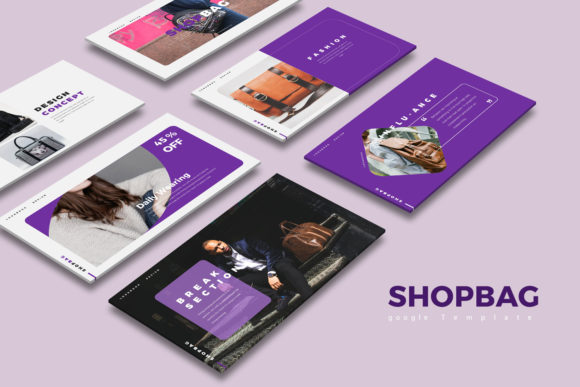
Because it is so flexible, you aren’t stuck in one lane. The template provides a white and dark background version, which is a massive practical advantage. If you're presenting in a bright, sunlit conference room, use the white slides for readability. If you're on a webinar or want a moodier, high-contrast vibe for a brand launch, switch to the dark version. It’s this kind of multipurpose design thinking that makes a premium font and template bundle worth the investment. It respects the fact that your presentation needs might change from one meeting to the next.
Practicality Meets Professional Polish
When it comes to brand identity and marketing, consistency is king. One of the biggest challenges for entrepreneurs and small business owners is maintaining a consistent look across all their design assets. ShopBag solves this by offering 30 unique slides (totaling 60 slides with the background variations). This variety ensures you aren't recycling the same three layouts over and over, which can make a pitch feel repetitive.
The features included are things that actually save time in the trenches. For example, the fully editable charts are a lifesaver. Instead of struggling to build a bar graph in Slides, you can edit the data directly in Excel, and it updates instantly. This is crucial for data-heavy industries or quarterly reviews. Similarly, the vector icons are included right in the file. You don’t need to go hunting for external icon packs or worry about resolution issues. Everything is built to be easily editable and customizable, meaning you can swap out colors, resize elements, and drop in your own photos using the image placeholders without breaking the layout.
Matching the Template to Your Project
How do you know if ShopBag Google Slide Templates are the right fit for your specific project? Think about your audience. If you are a blogger or content creator looking to create a media kit, the clean typography and modern typography style help elevate your work, making your stats and partnerships pop. For marketers and brand strategists, the professional layout aids in visual hierarchy. Your key takeaways and calls to action won't get lost in the noise.
It also works exceptionally well for web design proposals or packaging design presentations. Because the style is relatively neutral but high-quality, it acts as a frame. It doesn't compete with your actual work; it supports it. If you are presenting a logo design concept, you want the slides to feel professional so the logo looks like a million bucks. The 16:9 aspect ratio is the standard for modern screens, ensuring your work looks crisp on everything from a laptop to a projector.
Getting Started and Customizing for Success
Getting up and running is straightforward, but there are a few details to keep in mind. The template uses free fonts, which is a huge bonus for small business owners watching their budget. You don’t need to purchase expensive commercial font licenses to make the presentation look good. However, you absolutely must install the specified fonts before opening the file. If you skip this step, the text will default to something generic, and the design will lose its intended rhythm and spacing.
Once you have the fonts installed, dive into the customization. Don't just swap the text; look at the font pairing choices already made in the template. Notice how the headers relate to the body text. This is a great learning opportunity if you're new to editorial design. You can keep the provided pairings for a foolproof look, or experiment with other combinations if your brand identity requires a specific serif font or sans serif font.
Finally, remember that while the stock photos shown in the preview aren't included, this is actually better for you. It forces you to use your own imagery, which makes the presentation authentically yours. Use the image placeholder feature to drag and drop high-res images of your own products, team, or work. Whether you are a hobbyist sharing a project or a designer pitching a high-stakes client, having a toolkit like ShopBag ensures you start from a place of strength, not zero.