Automotica: The Powerpoint Template for Modern Business
When you’re building a brand, a pitch deck, or a marketing presentation, the design framework you choose speaks before you do. The Automotica Powerpoint Presentation is not just a collection of slides; it is a structured environment designed to convey competence and modernity. It operates on the principle that a presentation should be a visual partner to your content, not a distraction. This template is built for those who need to project an image of efficiency and forward-thinking strategy, whether you are a startup founder, a corporate strategist, or a creative agency pitching a new campaign.
Visual Identity and Design Architecture
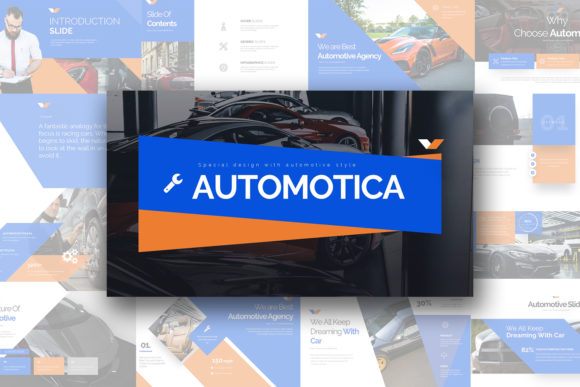
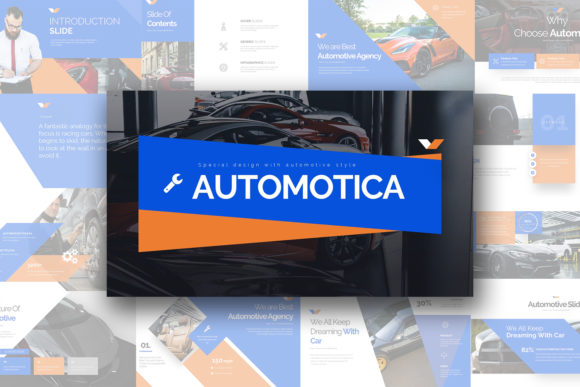
The strength of the Automotica Powerpoint Presentation lies in its architectural approach to layout. It avoids the cluttered, chaotic look of older templates in favor of a "clean, creative, simple, unique" aesthetic. With 30 unique slides and a total of 180 slides across the package, the variety is substantial. The design language relies heavily on negative space, allowing your content to breathe. This is crucial for modern typography and readability; a crowded slide forces the audience to work too hard to parse information, whereas the balanced composition of Automotica guides the eye naturally from the headline to the supporting data.
Visually, the template balances corporate stability with creative flair. The use of a 16:9 aspect ratio ensures it looks native on modern widescreen displays, filling the frame without letterboxing. The inclusion of three distinct color schemes—available on both white and dark backgrounds—provides immediate versatility. The dark backgrounds are particularly effective for high-contrast branding, making colors pop and lending a sense of premium exclusivity to the presentation. This flexibility is a massive asset for brand identity work, allowing you to adapt the template to match specific client guidelines or internal brand books without starting from scratch.
Practicality Meets Creative Control
A template is only as good as its adaptability. One of the most practical features of the Automotica Powerpoint Presentation is its commitment to user control. Every element is editable, but the template goes further with fully editable charts that link directly to Excel. This is a non-negotiable feature for data visualization. Whether you are presenting quarterly financials, marketing metrics, or project timelines, the ability to manipulate the data directly within Excel while maintaining the visual style of the presentation saves hours of manual adjustment.
Furthermore, the inclusion of vector icons and image placeholders streamlines the workflow. In the past, designers had to import assets manually, often dealing with resolution issues. Here, the vector icons scale without pixelation, maintaining the crispness of your web design or print design assets. The image placeholders allow for drag-and-drop functionality, which is essential when working under tight deadlines. This "multipurpose" nature makes it a reliable tool for everything from internal reports to client-facing pitches. It treats the user like a professional, providing the tools necessary for high-level editorial design without requiring advanced technical skills to execute them.
Strategic Application for Professionals
For entrepreneurs and marketers, the Automotica Powerpoint Presentation serves as a foundational design asset. Its "scalable" nature means it can grow with a project. You might start using it for a simple investor pitch, but its robust structure supports complex, multi-sectioned corporate overviews just as easily. The personality of the template is one of authority and clarity. It does not rely on gimmicks; instead, it uses solid graphic design principles—alignment, contrast, and repetition—to build trust with the audience.
Consider the context of packaging design or product launches. A slide deck built with Automotica can serve as the central hub for a campaign, housing the mood boards, competitive analysis, and rollout strategy. The consistent styling helps maintain visual hierarchy, ensuring that key messages are not lost in the noise. For content creators and bloggers, this template can be repurposed for media kits or partnership proposals, presenting statistics and audience demographics in a format that looks polished and credible.
Integration and Workflow Optimization
The Automotica Powerpoint Presentation is designed to integrate seamlessly into a professional workflow. The documentation and quick guide included in the files are particularly helpful for users who may not be PowerPoint experts, offering clear instructions on how to maximize the template's potential. It is worth noting that while the template includes a free font recommendation, stock photos are not included. This is actually a benefit for professionals; stock photos often date a presentation or look generic. By allowing you to insert your own high-resolution photography or custom logo design assets, the template ensures the final product feels bespoke and authentic to the specific project.
In conclusion, the Automotica Powerpoint Presentation is more than a static set of slides. It is a dynamic framework that supports the complex needs of modern business communication. It bridges the gap between creative font usage and corporate structure, offering a clean canvas that adapts to the user's specific goals. For anyone serious about their professional presentation, this template offers the flexibility, scalability, and visual polish required to make a lasting impact.