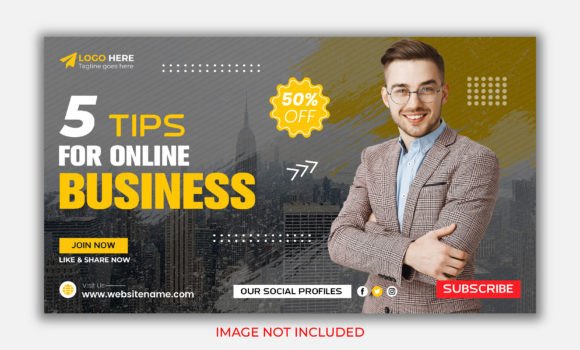
5 Tips for Online Business Grow Banner: Design That Drives Action
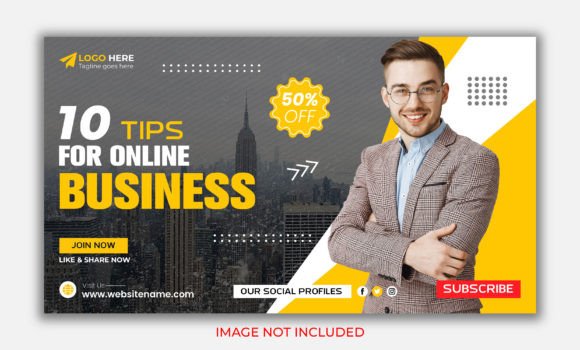
Standing out in the digital marketplace requires more than just a good idea; it demands visual communication that stops the scroll and compels a click. The "5 Tips for Online Business Grow Banner" template is built specifically for this high-stakes environment. It’s not just a static image file; it is a strategic design asset created for entrepreneurs, marketers, and content creators who need to project immediate authority and professionalism. Whether you are promoting a new YouTube series, launching a webinar, or updating your website’s hero section, this template serves as a foundational piece of modern typography and layout design. It bridges the gap between raw data and compelling storytelling, ensuring your five key points are not just seen, but absorbed.
The Visual DNA of the Template
At its core, the "5 Tips for Online Business Grow Banner" is a masterclass in balance and visual hierarchy. Designed in Adobe Illustrator CC at a crisp 1280x720 pixel resolution, it utilizes the RGB color spectrum to ensure vibrant, screen-optimized output. The visual personality of this design leans towards clean, corporate minimalism with a creative twist. It avoids the clutter often found in generic marketing materials, opting instead for well-organized layers that guide the viewer's eye naturally from the headline to the supporting imagery. The style is professional yet approachable, making it versatile enough for both a serious B2B marketing campaign and a dynamic lifestyle brand. Its appeal lies in its adaptability; it acts as a sophisticated container for your content, allowing the message of "5 Tips" to take center stage without the design overpowering the text.
Strategic Placement: Where This Design Asset Shines
Understanding where to deploy the "5 Tips for Online Business Grow Banner" is crucial for maximizing its impact. Given its specific dimensions and editable nature, it fits seamlessly into several key areas of digital and print marketing.
Primarily, this template is a powerhouse for YouTube video promotion. As a thumbnail or end-screen, it provides the perfect canvas to tease the value within your video. The 1280x720 aspect ratio is the native standard for YouTube, ensuring your image doesn't get cropped awkwardly. However, its utility extends far beyond video platforms. It is an ideal candidate for web design, specifically as a hero banner on a landing page dedicated to lead generation. By using this template, you can instantly communicate the value proposition of your newsletter or product.
Furthermore, in the realm of social media graphics, this banner works exceptionally well for Facebook event covers or LinkedIn promotional posts where a professional aesthetic is required. For bloggers and publishers, it can serve as a featured image for listicle articles, creating a cohesive visual identity across your content management system. Even in print design, such as a half-page magazine ad or a workshop handout, the vector-based EPS file allows for resizing without loss of quality, maintaining the integrity of the brand identity.
Mastering Typography and Hierarchy
The effectiveness of any banner promoting "5 Tips" relies heavily on readability and visual hierarchy. A viewer should be able to glance at the image for three seconds and understand exactly what is being offered. The "5 Tips for Online Business Grow Banner" template facilitates this by providing designated zones for high-impact text. When customizing this asset, pay close attention to your font choices.
The template acts as a neutral ground for various typographic styles. If your brand uses a serif font for authority, the clean lines of the banner will support it. Conversely, a bold sans serif font will reinforce a modern, tech-forward vibe. The key is contrast. Use a heavy weight for the number "5" and the word "Tips" to create a focal point, while using a lighter weight for supporting details. This interplay between different typefaces—a practice known as font pairing—is essential for creating depth. By manipulating the text layers within Illustrator, you can ensure that your message cuts through the digital noise, influencing how your audience perceives your brand identity as organized and knowledgeable.
Practical Customization and File Management
To get the most out of this design asset, you need to approach the editing process with a strategy. The package includes an EPS file compatible with Adobe Illustrator CC and a Help file with font download links. Here is how to execute a professional edit:
- Layer Organization: Open the EPS file and immediately familiarize yourself with the layer structure. A well-organized file allows you to isolate the background, text elements, and graphic accents. This is vital for packaging design or complex composites where you might need to move elements around.
- Font Integration: Before starting your design, download the recommended fonts listed in the Help file. Using the suggested typefaces ensures the layout remains balanced as originally intended by the designer. However, feel free to experiment with your own premium font library to match your specific brand identity.
- Color Theory: The file is set to RGB, which is perfect for screens. If you intend to use this for print design, you will need to convert the color mode to CMYK. Be aware that this might shift the vibrancy of the colors, so manual adjustment of the hex codes will be necessary.
- Imagery Integration: Note that stock images are not included. This is actually a benefit, as it allows you to insert high-resolution photos of your own products or team, ensuring the banner feels authentic to your business rather than generic.
From Template to Traffic: Final Recommendations
The "5 Tips for Online Business Grow Banner" is more than just a downloadable file; it is a launchpad for your marketing campaigns. By leveraging its modern typography structure and editable vector format, you can create consistent, high-quality visuals that resonate with your target audience. Whether you are a small business owner looking to establish credibility or a content creator