The Dream Wedding Magazine: A Designer's Template for Elegant Editorial Design
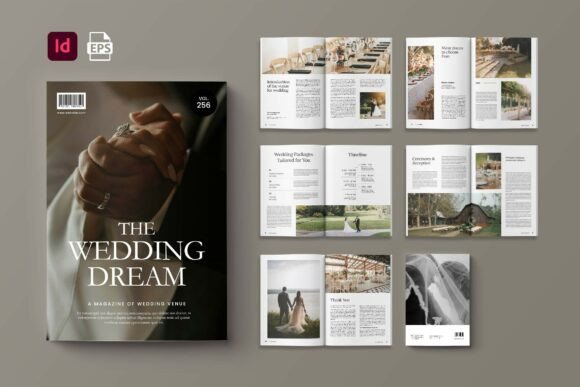
When a client approaches you with a tight deadline for a high-end publication, the difference between a frantic scramble and a smooth delivery often comes down to your assets. The Dream Wedding Magazine is one of those design assets that bridges the gap between a raw idea and a polished product. It is not merely a collection of pages; it is a professional framework built in Adobe InDesign, structured specifically for creators who need to produce sophisticated editorial work without starting from a blank canvas. With its standard A4 dimensions (21cm x 29.7cm), CMYK color format, and 300 DPI resolution, this template is print-ready from the moment you download it, provided you respect the 3mm bleed guidelines.
Anatomy of a Clean Editorial Layout
The visual personality of The Dream Wedding Magazine is defined by its restraint. In an era where design can often become cluttered with competing elements, this template embraces a "less is more" philosophy. The layout relies on a strong grid system, ensuring that text blocks and image placeholders align perfectly. This is crucial for establishing a professional brand identity. Whether you are working on a wedding journal, a lifestyle catalog, or a niche book, the structure supports a modern typography approach. It allows the content to breathe, which is essential for maintaining reader engagement over 14 custom pages.
The template’s appeal lies in its versatility. It is designed to be a vessel. The clean margins and ample white space act as a neutral canvas, allowing your specific choice of imagery to take center stage. For a graphic designer, this means you aren't fighting the layout; you are collaborating with it. The inclusion of a free font (available via DaFont or Google Fonts) ensures that there are no licensing hurdles for the initial typography, though the template is robust enough to handle premium font replacements if the project demands a more exclusive aesthetic.
Strategic Applications Beyond Weddings
Despite its name, The Dream Wedding Magazine is not strictly limited to nuptials. Its clean, editorial structure makes it a powerful tool for a variety of industries. Entrepreneurs and small business owners can adapt the layout for quarterly lookbooks or product catalogs. The grid system is particularly effective for packaging design mockups or presenting a cohesive brand strategy to a client. Imagine using the layout to showcase a new line of artisanal goods; the A4 format provides enough real estate to display high-resolution photography alongside detailed product descriptions without feeling cramped.
For digital marketers and bloggers, the template offers a solution for lead magnets. Converting a 14-page InDesign document into a downloadable PDF guide can significantly boost email list growth. Content creators can use it to compile recipes, travel guides, or style reports. The key is that the template provides a level of visual hierarchy that is difficult to achieve with standard word processors. It signals to the audience that the information presented is curated, valuable, and trustworthy. This perception of professionalism is a critical component of effective brand identity management.
Technical Flexibility and Workflow Efficiency
One of the standout features of this template is its organization. The layers are neatly separated, which is a lifesaver when you need to make last-minute adjustments. If you are working in Adobe InDesign, you can easily swap out placeholder images using smart layer functionality. This allows for rapid prototyping. A marketing team could theoretically mock up three different versions of a magazine cover in under an hour by simply toggling visibility on different layers and swapping text content.
Regarding typography, while the template includes a specific free font, it is designed to be a playground for font pairing. The clean sans-serif headers often found in such layouts pair beautifully with a serif font for body text, creating a classic editorial feel. However, you could easily swap the header typeface for a bold display font or a subtle script font to shift the mood entirely. For instance, replacing the standard header with a handwritten font could instantly make the magazine feel more personal and intimate, perfect for a DIY or crafting niche publication.
Practical Guide to Customization
To get the most out of The Dream Wedding Magazine, start by evaluating your specific project needs. Are you creating a digital flipbook or a physical print run? If printing, ensure your printer's specifications align with the CMYK and 300 DPI setup. Next, consider the content flow. The 14 pages are a finite space; map out your narrative arc before diving into InDesign. Use the first few spreads for a strong cover and table of contents, utilize the middle spreads for your heaviest visual content, and reserve the back cover for contact information or a call to action.
When customizing the design assets, pay attention to the bleed area. It is tempting to ignore the 3mm bleed, but doing so can result in white edges on your final printed product if the cutting machine is slightly off. Extend your background colors and images all the way into the bleed zone. Furthermore, while the template is ready to use, always review the licensing of any new fonts or stock images you introduce. While the provided font is free for commercial use, any premium font you add to elevate the design will have its own licensing terms that you must adhere to.
Elevating Brand Perception Through Layout
The structure of a magazine often dictates how the content is perceived. A cluttered layout can make even high-quality content feel cheap, while a structured, grid-based layout—like the one found in The Dream Wedding Magazine—lends authority to the words and images within. This is particularly important for small business owners trying to establish credibility. A well-designed catalog or journal serves as a silent ambassador for your brand. It demonstrates attention to detail and a commitment to quality that resonates with a target audience of adults aged 20 to 50 who value aesthetic coherence.
Ultimately, this InDesign template is a tool for efficiency and elegance. It removes the technical barriers to entry for high-end publishing. Whether you are a hobbyist creating a family memoir, a designer assembling a client portfolio, or a publisher looking for a layout for a niche journal, the foundation is solid. By leveraging the clean layers, standard print specifications, and adaptable grid, you can produce a publication that looks like it came off a professional press, ensuring that your creative vision is realized with clarity and style.